

According to statistics, the average person consumed 17 hours of online video content per week in 2023. In addition, they were twice as likely to share videos than any other content format. And if you ask me, it’s safe to say that this trend will continue well beyond 2024, too. With so much interest in video content, it is no wonder that video ads are such a prolific source of income for publishers. However, before venturing into the video ad monetization waters, publishers need to get acquainted with various video ad formats. Let’s start with the basics and discuss the differences between instream and outstream video ads.
A Quick Glance at IAB’s Video Ad Classifications
Before we jump into it, I would like to refresh your memory of IAB’s video ad format classifications. In March 2023, the Interactive Advertising Bureau (IAB) came out with a video ad classification system, which more clearly defined the various types of video ads. The new system recognizes four main categories of video ads:
- Primary Instream Ads — Video ads that play before, during, or after a stream within a video player, with the sound on. Basically, what you already know to be an instream video ad.
- Accompanying Content — Similar to primary instream ads, but the video content itself is not the primary focus of the user’s attention. Rather, it is an accompanying addition to editorial content.
- No Content/Standalone — Ads that we commonly refer to as outstream ads, i.e. standalone video advertisements not tied to any specific piece of content.
- Interstitial Ads — Full-screen advertisements that cover the main content of the web page or app.
The gradual implementation of these changes is already taking place, with many DSPs already having switched over to the new classification system. However, although these are important changes to the advertising landscape, they do maintain the traditional idea of the difference between instream (both primary and accompanying) ads and outstream (i.e. no content) ads. So without further ado, let’s dive into the debate about instream vs. outstream video ads.
Learn more about the March 2023 Update here.
What Are Instream Video Ads?
Instream video ads are advertisements that show up within a video stream, i.e. while a user is watching video content. This ad format is especially common on video-sharing sites such as YouTube. If you have ever viewed video content online, chances are that you’ve seen an instream ad.
Types of Instream Ads
Of course, things aren’t as simple as that. Instream video ads also come in various shapes and sizes. The Interactive Advertising Bureau makes a distinction between three main types of instream video ads: linear ads, non-linear ads, and companion ads.
Linear Video Ads
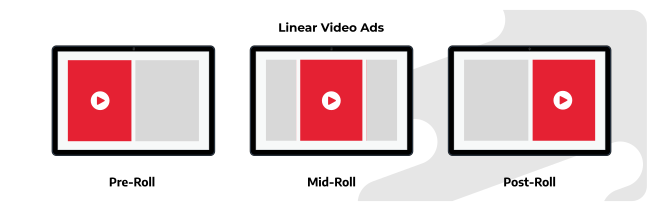
The most common type of instream ads, linear video ads show up before, during, or after a video, interrupting the content stream. In that sense, they are much like traditional TV advertisements. Depending on their position, linear video ads can be pre-roll (before a stream), mid-roll (during a stream), and post-roll ads (after a stream). Linear instream advertisements are the most lucrative for publishers, as they usually come with the highest CPMs and are practically impossible to ignore.
Non-Linear Ads
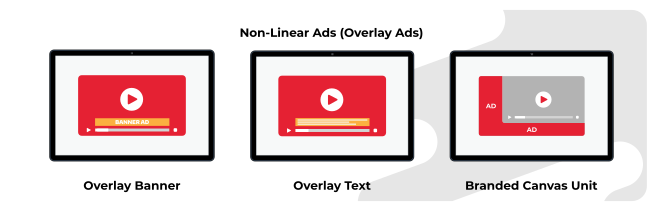
Also known as overlay ads, non-linear video ads appear during a video and within the player, but without obscuring or interrupting the playback. In other words, they are less intrusive than linear ads, as they allow viewers to keep watching the video while the ad is playing. They can appear in the form of a banner ad, text, or rich media ad.
Non-linear video ads are an excellent addition to any publisher’s repertoire since they complement linear ads perfectly and serve as an additional source of revenue.


Follow TargetVideo on LinkedIn to stay up-to-date with the latest developments in the industry!
Follow UsCompanion Ads
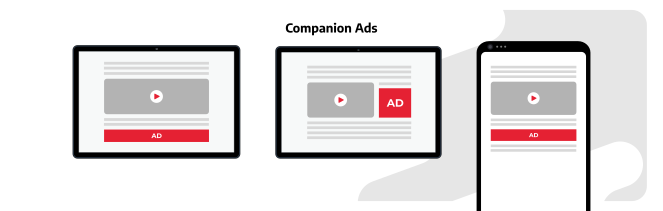
Technically not an instream format in the narrowest sense of the word, companion ads don’t appear within the video stream. However, they usually show up alongside a video in the form of an image, text, or rich media ad, but outside of the player itself. They appear in conjunction with a linear or nonlinear instream ad, earning them the name companion ads. They are great for improving brand visibility and fighting banner blindness.
What Are the Pros and Cons of Instream Video Ads?
When comparing instream video ads to outstream ads (or other ad formats, for that matter), they come out on top almost every time. One of the most notable advantages of instream video ads is that they come with higher CPMs. So naturally, they are the go-to choice for publishers looking to increase ad revenue.
Another great thing about instream video ads is their compatibility with OTT and CTV advertising. So if you’re an OTT publisher, you should definitely consider enlisting instream ads in your ad monetization strategy.
Are you planning to venture into the OTT waters? Check out TargetVideo’s white-label OTT solutions!
Despite all their advantages, instream ads come with a few downsides, too. One of the most important ones is that most users perceive them as highly intrusive, especially in the case of linear ads. This is also becoming more and more apparent as large video websites such as YouTube are actively trying to crack down on ad blockers.
Another thing to consider is that instream ads require publishers to have an HTML5 video player and existing video content. Unfortunately, not all publishers have a rich video library or the means to make one.
Luckily, with TargetVideo’s Video Content for Publishers, you can easily get original video content from an array of verticals, including food, home, parenting, fashion, and more.
Pros:
-
Higher CPMs
-
Compatible with OTT and CTV
-
Attention-grabbing and engaging
Cons:
-
Intrusive to the user experience
-
Require existing video content
-
Require an ad-compatible video player
What Are Outstream Video Ads?
Unlike their instream counterparts, outstream video ads appear separately from video content. For example, they may show up in a website’s sidebar, in one of its corners, or within the editorial content.
Publishers can serve outstream ads natively on the web page or through a third-party video player. In addition, they don’t need to have video content in order to serve outstream video ads.
Outstream ads were originally designed as a mobile ad format, but they quickly proved themselves to be quite lucrative in the desktop advertising space, too.
What Are the Types of Outstream Video Ads?
Since they are independent of video content, outstream ads come in an array of formats. However, in general, we can divide them into three broad categories.
In-Slide Outstream Video Ads

Likely the most common outstream format, in-slide outstream video ads appear in a corner of the webpage in a video player. They stick to that spot and follow the user as they scroll. In-slide ads start playing muted automatically. All of this makes them a great choice for boosting ad viewability.
Users can turn these ads off at will (or after a few seconds, depending on the player settings). Otherwise, the player can shut off automatically after the ad is over or keep playing more advertisements in a loop.
TargetVideo’s publishers can easily set up in-slide outstream ads through the CMS. The in-slide unit comes with an array of customization options (button availability and positions, player colors, volume control, etc.), allowing publishers to tailor it to their liking.
See the in-slide ad unit in action here.
In-Content Video Ads

Unlike in-slide units, in-content outstream ads don’t follow the user around while scrolling. Instead, they show up within the editorial content in a separate video player. As the user scrolls down to where the in-content ad unit is located, the player loads and starts playing the ad. Although variations are possible depending on player settings, here’s how these ads generally behave as the user scrolls:
| Player Visibility on Screen | Player Behavior |
|---|---|
| 0% | The ad loads on the page |
| <50% | The player loads, but the ad doesn’t begin playing |
| 50+% | The ad begins playing |
| <50% after the user scrolls past | The ad pauses (and continues playing if the user scrolls back to the player) |
This video ad format is particularly popular with websites with lots of text-based content, as it enables a seamless and non-intrusive UX. In my experience, it also works particularly well for native video ads.
TargetVideo’s publishers can incorporate the in-content video ad format into their monetization strategy in just a few clicks through the CMS.
See the in-content ad unit in action here.
In-Banner Video Ads

Unlike the previous two formats, in-banner video ads are technically not a video ad format, but rather a banner ad in the form of a video. As a rule of thumb, these ads play without sound and may include captions or subtitles.
What Are the Pros and Cons of Outstream Video Ads?
Outstream video ads come with several irrefutable benefits, even when compared to their instream counterparts. One of the biggest advantages is that they are far less intrusive since they don’t interfere with the user experience.
Another great thing about outstream video ads is that publishers can use them even if they don’t have any video content on their websites. This flexibility is undoubtedly one of their primary selling points.
However, as versatile as they are, outstream ads also have several notable flaws. For instance, unlike instream formats, their use is much more tightly regulated by advertising giants like Google. This is best demonstrated in the fact that, if they have the autoplay option activated, outstream ads must be set to “mute” by default, making them much less noticeable.
Another important flaw is that outstream ads are heavier on the back end and may slow down your website. They are also more prone to discrepancies in the communication between ad exchanges and ad servers.
Pros:
-
Less intrusive
-
Highly flexible
-
Don’t require video content
Cons:
-
More strictly regulated
-
Not as noticeable
-
Can impact website performance
Instream or Outstream Video Ads — Which Format Is Better for Publishers?
As you have seen by now, instream and outstream video ads both have their fair share of pros and cons. That’s why I can’t really say either is strictly better. They’re both suited for different types of publishers and different monetization strategies.
If you are a publisher with a rich video library or want to launch an AVOD service, you’ll be better off monetizing with instream ads. If you’d like to boost your ad revenue on a website without video content, outstream ads would be the way to go.
However, from personal experience, it’s best to use these two formats in unison. For instance, you could focus on instream advertising for maximum revenue but still serve outstream ads on pages without video content. That way, you can make the most of your ad inventory.
| Parameter | Instream Video Ads | Outstream Video Ads |
|---|---|---|
| CPMs | ✅ | 🆇 |
| Ad Viewability | ✅ | 🆇 |
| User Experience | 🆇 | ✅ |
| Website Performance | ✅ | 🆇 |
| Variety of Formats | 🆇 | ✅ |
| Autoplay With Sound | ✅ | 🆇 |
| OTT & CTV Compatibility | ✅ | 🆇 |
Serve Instream and Outstream Ads With TargetVideo
If you’re looking for an easy way to put video ads on your website or app, a versatile online video platform like TargetVideo will be your best bet. Publishers can use our monetization solution to set up and serve instream or outstream video ads in just a few clicks.
TargetVideo also has an array of advanced tools, services, and features designed to help you achieve the full potential of your monetization efforts. Use our Yield Optimization Engine to optimize price floors or leave all the work to our ad ops team with the Managed Ads Service. You can also receive quality display and video ads from reputable sources with our Premium Demand.
Contact our sales team to get started!
Full Control Over Monetization
The Most Advanced Ad Tech
Multi-Role Library Management
OTT Apps for All Channels
Smooth Live Streaming
And More!
FAQ
1. What is the difference between instream and outstream ads?
The main difference between instream and outstream ads is their placement. Whereas instream ads are tied to video content and show up within the stream, outstream ads are independent of existing content and play in their own video player.
2. What is an instream video ad?
An instream video ad is a video ad format that shows up within a video the user is watching. They interrupt video content and, in that way, resemble traditional TV advertisements.
3. What is an outstream video ad?
An outstream video ad is a video ad format that shows up in its own video player independent of any existing video content. These ads may appear in the corner of a user’s screen or within the editorial content on a page.


