

With video content consistently outperforming other content formats online, it probably won’t surprise you that video ads perform better than other formats, too. With marketers investing more and more in digital video advertising each year, it’s the perfect opportunity for publishers to get a piece of the video ad revenue pie. So, to get you started, I created an easy-to-follow guide on how to put video ads on a website.
- What Are Video Ads
- Why You Should Use Video Ads to Monetize Your Website
- How to Get Video Ads on Your Website
- Monetize Your Website With TargetVideo
- FAQ
What Are Video Ads
By definition, video ads are all advertisements in the video format, usually delivered online. They can be served within a video stream or outside of the page content in a separate outstream video player.
How Do Video Ads Work?
Depending on the type of video ad, the process of video ad serving can vary. For instance, for pre-roll instream video ads, the common notion is that when a user clicks on the play button to watch a video, the video player shows a quick ad first, and after a few seconds, the video begins. For outstream ads, usually, the video player appears outside of the main content and automatically plays the video ad.
Behind the scenes, the process goes as follows:
- When a user clicks the play button or an outstream ad call is triggered, the video player requests a video ad from the publisher’s ad server.
- In programmatic advertising, an auction for the piece of inventory is held, and the winner is the demand source offering the highest CPM.
- The ad server sends back a code, known as an ad markup, telling the player exactly which ad to serve.
- Using the markup, the player now contacts the advertiser’s server to request the location of the relevant ad.
- The player contacts a CDN, where ads are usually stored and receives back the ad.
- Finally, the user sees the winning ad in the video player.


Follow TargetVideo on LinkedIn to stay up-to-date with the latest developments in the industry!
Follow UsHow Much Do Video Ads Pay?
There is no precise sum for potential earrings from video ads. However, the following factors can heavily impact the amount of video ad revenue a publisher receives:
-
Available inventory on your website;
-
Your inventory price floors;
-
The optimization of your ad strategy
-
Your website traffic;
-
Relevancy of ads served to your users;
-
Clickthrough rates for the served ads.
It is worth noting that websites with low traffic and under 100,000 visitors a month don’t generally earn much from ads, as they don’t offer an extensive audience. In addition, many monetization platforms and ad networks have a minimum traffic requirement for website publishers who wish to join. This is where TargetVideo stands out! Our network of over 500+ websites can help smaller websites reach these higher CPMs by simply joining our network.
Why You Should Use Video Ads to Monetize Your Website
There are multiple advantages to video ad monetization, the most beneficial being:
-
Higher Revenue Potential — While display ads are still the most frequently used ad format, the demand for video ad inventory is worth investing in due to scarcer availability. Publishers can set higher CPMs for video inventory and potentially double the revenue they receive from display ads.
-
Better Engagement — Using the same old ad format can cause ad fatigue. By incorporating a variety of ad formats on your website, you can improve the user experience. Especially with how engaging video content is. In addition, many outstream video ads come with no sound to avoid disrupting the user.
-
New Revenue Streams — For those already monetizing their website content with display ads, having additional ad inventory diversifies their revenue streams. This way, publishers can serve more ads and gain more revenue.
You Might Also Like: How to Pick the Best Ad Formats for Your Website
How to Get Video Ads on Your Website
We’ve covered the basics of what video ads are, how they work, and how much you can expect to earn from having them on your website. But how do you actually go about putting them there? To help you out, I’ve put together this detailed step-by-step guide.
1. Decide Which Ad Format You Want to Use
There are many video ad formats available. The first step to adding video ads to your website is to choose whether you want to serve instream and outstream video ads. In general, instream ads are better for publishers who already have video content on their websites, while outstream ads are better for those who don’t. But as with most things, it is actually a little more nuanced than that. Here’s how to choose between the two.
Instream Video Ads

Instream video ads show up within the video stream and interrupt it. They can show up before, during, or after a video. They can also be skippable after a few seconds, although this is not always the case.
If you’re new to the world of advertising, you are probably familiar with instream video ads from YouTube, as they are one of the driving forces of YouTube monetization.
Instream advertisements are generally considered to be the more profitable of the two options. They are hard to ignore, as they are served in the same player as the video we want to watch. If done right, they really have the power to capture the attention of viewers and generate better clickthrough rates.
Due to their better performance, instream ads have the power to generate more revenue for you. However, if you want to implement instream video ads, you need to have existing video content on the website.
Pros:
-
Difficult to ignore
-
Higher CPMs
-
More engaging
Cons:
-
Require existing video content
-
Can be intrusive and annoying
-
Require an HTML5 player
If you want to reap the benefits of instream video ads but don’t have any videos, you’ll be happy to hear that TargetVideo also offers exclusive, monetizable video content for publishers. You can pick from thousands of videos from our in-house video library that covers various content verticals, including parenting, sport, DIY, health, and more.
Outstream Video Ads

As you may have already guessed, outstream video ads are served outside a native video stream. For example, you may see them in a website’s sidebar, corner, or editorial content. They might stay on the screen as you scroll as a sticky ad unit or autoplay when you scroll over them.
There are several advantages to using outstream video ads. First of all, they’re not as intrusive as their instream counterparts. Secondly, there is an array of customization possibilities to make the outstream ad player fit your ideas and goals. Lastly, they don’t require any existing video content on the website.
However, since outstream ads are not part of a content stream, they are also easier to overlook and ignore. Secondly, outstream video ads usually have to follow much stricter guidelines than instream ads. And lastly, they simply don’t perform as well as instream ads.
Pros:
-
Not as intrusive
-
Don’t require existing video content
-
Easier audience targeting
Cons:
-
Easy to overlook
-
Not as profitable
-
Can affect website speed
2. Join a Reliable Video Ad Network (Or Several)
Video ad networks are a point of contact between publishers who want to sell their ad inventory and advertisers who want to buy it. In a way, they serve as brokers in these transactions.
In short, ad networks take a bulk of ad space provided by publishers and offer it to advertisers in a real-time bidding auction. Advertisers then set the parameters for their campaigns, such as the target audience, budget, or frequency. On their end, publishers need to set up price floors and appropriate ad tags to allow the website to run ads.
Ad networks take a percentage of every transaction, while the rest goes to publishers. Aside from purchasing, they also make it easy to manage and track the performance of a campaign. Once everything has been set up, advertisers can manage their campaigns using the ad network’s dashboard.
There are many ad networks out there. In order to choose the right one for your business, you need to know exactly what you’re looking for. Here are some important factors to keep in mind:
-
Targeting — The ad network you choose should have as many audience targeting options as possible. Some things to look for include geographic and contextual ad targeting. Ads that are targeted well tend to perform better and, by extension, bring you more ad revenue.
-
Analytics — Powerful and detailed analytics (preferably of the real-time kind) will help you tweak and adjust the ad serving strategy in order to bring in more revenue.
-
Various Ad Formats — Decide which ad formats you want to include on your website, and then find an ad network that supports those. Keep in mind that you might want to change your preferences in the future, so it’s best to pick an ad network with a wide range of formats available for as many different devices as possible.
-
UI/UX — Unless you’re already familiar with video advertising, your ideal ad network should be beginner-friendly. For example, you can look for a platform that has dedicated publisher support or an ad optimization team.
Probably the most popular ad network on the internet is Google AdX, a part of Google Ad Manager. However, this platform is mostly reserved for large-scale publishers with massive website traffic. If you don’t get millions of monthly visitors, there’s little chance you will qualify for Google AdX.
A more viable option would be to sign up for a provider with better availability, like TargetVideo’s Premium Ad Demand. TargetVideo can provide you with access to high-quality video ads and help you monetize videos across a variety of channels and devices. The platform also supports dozens of different formats.
What if You Have a Direct Deal?
If you’ve established a direct deal with an advertiser, you won’t necessarily need an ad network (although they do make things easier). In a direct deal, the advertiser provides the video ad directly to the publisher, rather than using ad tags. To place the provided video ad on your website, you will need a Google Ad Manager account. Use your GAM account to create the video ad campaign and target it to your inventory on one or more websites.
3. Find a Video Player With Extensive Ad Support
Having a good online video player is just as important as finding the right ad network. You can have the highest traffic, the highest quality content, and the best ads, but if your website visitors can’t see those ads because your player is not up to par, it’s all for nothing.
The video player you’re looking for needs to support all industry-standard ad formats, including VAST and VPAID. In addition to this, it’s important that it has advanced monetization options, such as video header bidding. These options will allow you to scale your business further down the road.
You don’t have to spend a fortune on an online video player. In fact, you don’t have to spend anything, as there are some free options out there. Popular open-source players are often free of bugs, as they are regularly updated by the community.
However, premium video players are still worth the price. With a premium video player, you get access to a professional support team ready to address any issues you may have. What’s more, your income won’t depend on the benevolence of the community, but on a company where you are a paying client.
The HTML5 video player is generally considered by industry experts to be the best online video player available right now.
4. Configure the Player and Implement Your Ad Tags
You have found the right ad network and player and sold some ad inventory. What now? It’s time to make those ads actually appear on your website. The first thing to do is to configure your player and implement ad tags. For starters, you need to optimize your player for smooth playback and make the player controls as simple as possible for your viewers. Customization can also be important as the player needs to align with your website’s design. That’s why a highly customizable player is your best bet.
The ad network you’ll be using will provide you with ad tags (snippets of code) that tell your video player where and how to fetch the ads. These tags are usually VAST URLs, XML-based standards for delivering video ads. Embed these ad tags into your video player configuration and it’s done. Before going live, always make sure to test your ad implementation.
If this sounds too complicated to you leave the setup to professionals! With Managed Video Player publishers get an end-to-end solution for video content, viewer engagement, and premium revenue. All you have to do is place the code on your website and our dedicated publisher success managers will handle the rest – from ad configuration to content selection, we’ve got you covered!
How to Configure the Player and Implement Your Ad Tags With TargetVideo
Here’s my step-by-step guide on how to do that using TargetVideo’s video content management system.
First, log into your TargetVideo CMS account and navigate to the website you want to add the ads to. Navigate to Players in the menu on the left, and then Add New at the top of the page. If you want to apply the new settings to multiple existing players, navigate to Templates instead. From here, you will be able to customize your new video player. This includes everything from the size of the player to whether or not it will warn the user to turn off their ad blocker.
Here, you will also want to adjust the monetization options for your player. Tweak any other settings according to your preferences and needs.

Now is the time to insert the ad tags you received into your new player. Close the settings and hover over the “Set Player Ad Stack” field to reveal the “Create New” option. From here, you can add and edit pre-, mid-, and post-roll ads.

5. Embed Videos on Your Website
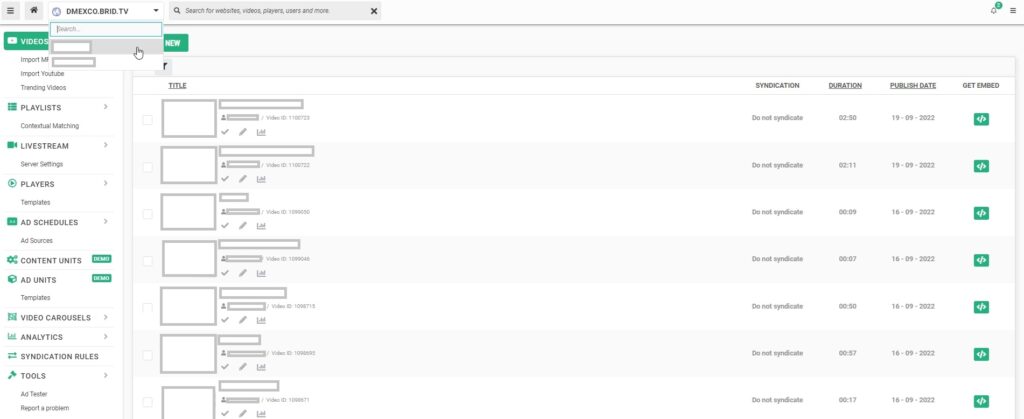
It’s time to place the video and ads on your website. You can easily retrieve embed codes for your videos from the video library. First, navigate to your video library or upload a new video. Click on the embed icon to the right.
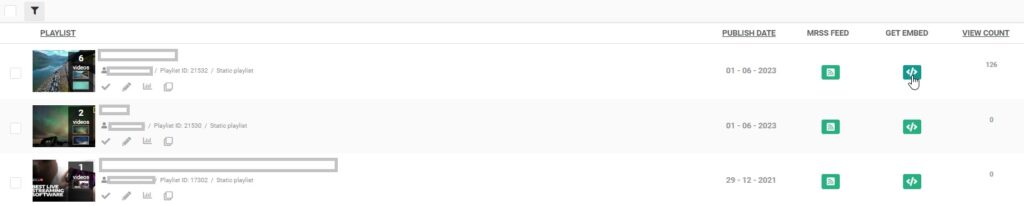
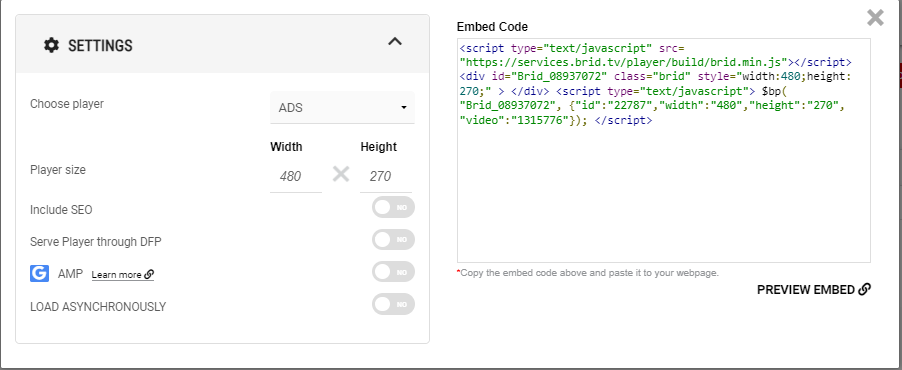
Choose the player you want to use for the video and copy the embed code. Then, simply paste the code on your website.
If you have TargetVideo’s WordPress plug-in, putting video ads on your website will be even easier. You can insert a video directly from your library and choose a player. This will generate a shortcode that you can simply copy and paste onto your page.
6. Track Ad Performance and Optimize Your Creatives
Now everything is set, your website visitors will see ads and bring you income. But your work doesn’t stop here. It is important to keep track of how these ads are performing and optimize them accordingly.
To do this, you will need advanced ad analytics tools. Luckily, if you go with TargetVideo’s comprehensive ad analytics, you will have access to a wide range of ad performance data, including impressions, plays, ad errors, engagement, CTR, and more.
Monetize Your Website With TargetVideo
For publishers interested in monetizing websites with video ads, TargetVideo is the perfect video monetization solution. With a superior HTML5 video player, multiple diverse instream and outstream ad units, a highly-skilled ad ops team to manage your ads, and premium quality ad demand, you’ll be able to reach and surpass your target revenue. Join our video platform or get the Managed Video Player and start monetizing.

End-to-end solution for publisher monetization, video content, and audience engagement. You embed the player – we do the rest!
Learn MoreFAQ
1. Can I add video ads on my website?
Yes, you can add video ads on your website, but you’ll first need to find and integrate a suitable online player.
1. How to get video ads on your website?
You can get video ads on your website by joining an online ad network. You will also require a reliable online video player, such as TargetVideo’s HTML5 player.
2. How to put ads on your videos?
To put ads on your videos, you will need to insert ad tags into your online video player. These tags are pieces of code that specify the size, format, and other characteristics of ads that can be served there.
3. How much do video ads pay?
Video ads can pay thousands of dollars if everything aligns well. For this to happen, you need to have a website with lots of traffic, well-targeted ads, and so on. However, if not implemented the right way, ads might not generate any money at all.
4. How much do video ads pay on apps?
Video ads on apps can make thousands of dollars a month. This is especially true for rewarded ads, where the user gets something in return — such as an in-game currency or award — for watching the ad.


