

Instream ads are by far one of the most popular and profitable ways to monetize video content. However, that’s only true if they’re set up properly. From the best ad placements to optimal price floors, there are many factors that play into just how much you can make from an instream video ad. To help out, I decided to share some of my top tips and tricks for earning more from instream advertisements.
What Are Instream Video Ads?
According to IAB Tech Lab, instream ads are all ads that accompany existing non-advertising video content. Based on this definition, there are three main types of instream video ads:
- Linear – Ads that interrupt the video the user is watching, much like TV commercials.
- Non-linear – Also known as overlay ads, these ads show up within a stream without interrupting it. Instead, they pop up in the form of a banner along the bottom, top, and/or sides of the player.
- Companion – Unlike the previous two, this format doesn’t show up within the video player. Instead, companion ads run concurrently with a linear or non-linear video ad, making the creatives pop out more.
As the most widely used instream ad format, linear ads typically show up before, during, or after a stream, and can thus be categorized as pre-roll, mid-roll, and post-roll ads. For clarity purposes, I will be discussing the benefits of and tips for linear instream video ads in this article.
Instream ads stand in contrast with outstream video ads, which show up in standalone video players, irrespective of the video content on the page.
Benefits of Instream Ads for Publishers
If you’ve ever spent time on YouTube or other video-sharing websites, odds are that you’ve seen an instream ad. But what is it that makes this video ad format so popular?
Aside from being generally effective for advertisers, these ads also have a lot of benefits for publishers:
- High CPMs – Video ads are generally more profitable than static formats. Among them, the instream format tends to generate the most revenue.
- Cross-channel compatibility – Video ads are just as viewable and engaging (if not more!) in mobile environments as they are on desktop. Whether you have an OTT or CTV app or simply want to put ads on your website, this format will get the job done.
- High viewability – Since these ads interrupt the video stream and are served in the player that the viewer is already looking at, they have high ad viewability. By extension, this brings in more impressions and a higher ad yield for publishers.
- Sufficient demand – Instream ads simply work well, and it’s no wonder that they’re quite popular among advertisers. In other words, there is no shortage of demand for this format.


Follow TargetVideo on LinkedIn to stay up-to-date with the latest developments in the industry!
Follow UsTips for Earning More With Instream Video Ads
So we can all agree that instream video ads are pretty great. They are a valuable source of revenue for digital publishers and a great promotional channel for brands. However, to make sure you’re really getting the most out of your ad inventory, there are certain best practices to follow. Here are my top tips & tricks for earning more from instream video ads.
1. Find the Right Ad Number and Placements
The right ad placement during a stream can make or break your monetization strategy. Unfortunately, there’s no clear formula I can give you to calculate exactly when an ad should pop up. The number and placement of your video ads will be determined by a handful of factors, such as the length and type of video, the duration and skippability of the ads, and so on.
So how can you figure out the best ad frequency and placement? In short – trial and error. Play around while keeping a close eye on both ad analytics and video analytics to see what works best for your website or app.
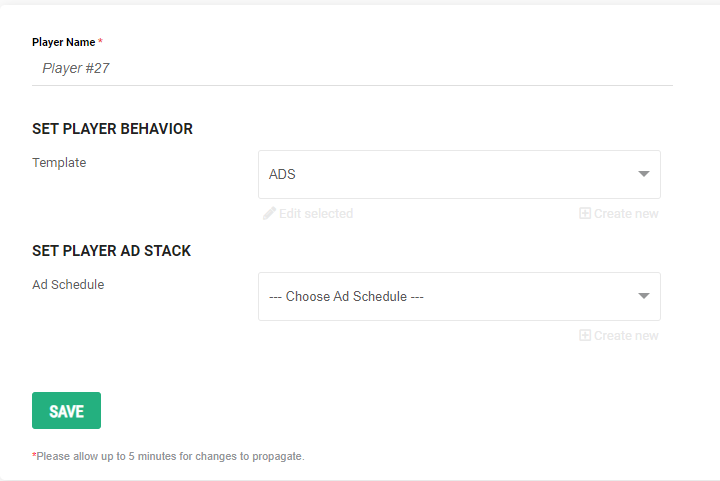
In the TargetVideo CMS, you can set up the placement of your instream ads in the Set Player Behavior and Set Player Ad Stack fields in the Player Customization view.
2. Make Use of Ad Looping
Ad looping is a handy feature that allows publishers to serve several ads consecutively in a single slot. Although it can be quite intrusive if you overdo it, it is a great tool for boosting monetization efforts.
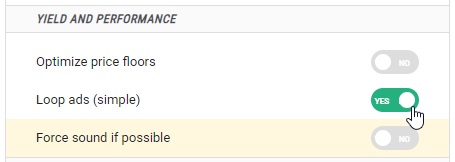
Looping your ads in the TargetVideo CMS is pretty simple. In the Set Player Behavior window, under Ads, simply turn the Loop Ads option on by clicking the button.
Find out more about ad looping here.
3. Use Engaging Content Units
Innovative and engaging content units will ensure that the ads get seen. For instance, a sticky video player will follow the user as they scroll through the page, ensuring that they’re still exposed to your content and potential ads.
See the sticky video player in action here.
In the TargetVideo CMS, you can activate the sticky player feature in the player customization menu by enabling “Stick Player to Viewport” in the Sticky Player panel.

4. Maximize Ad Calls With the Call Ad Again Feature
The Call Ad Again feature is a handy little tool in the TargetVideo CMS. It is available to all publishers who use the autoplay mode on their video player.
When your player sends an ad call in the autoplay mode, and no ads come back, the player will automatically switch to click-to-play. When the user clicks on the play button and activates the video player again, it will send another ad call for the pre-roll slot, maximizing your ad-serving opportunities.
You can activate this feature in the TargetVideo CMS in a few simple clicks. When setting up or customizing your player, first activate Autoplay, and then enable “if ad is present”. After that, the “Call ads on click again” option will appear in your customization window.

5. Use Playlists
Playlists have the potential to keep the user on your page (or app) longer. By extension, they also provide additional ad-serving opportunities for instream ads.
The one issue with playlists is that they require at least a few pieces of content. Ideally, this content will be organized around the same topic, event, or similar. What I’m trying to say is that coming up with a good playlist can be challenging.
Luckily, you can always rely on automated solutions, such as TargetVideo’s dynamic playlists. See the TargetVideo’s playlist in action here.
6. Optimize Price Floors
Regardless of how many tips and tricks you put into use, you could still be missing out on valuable revenue if your price floors aren’t set up right. Optimizing price floors is all about finding the right balance between getting higher-paying ads and getting any ads at all.
Figuring out the right floor values for your ad inventory can take a lot of trial and error, and it’s a task that is never truly done. Luckily, there are tools you can use to automate price floor optimization and ensure you’re getting the most out of your inventory. TargetVideo’s Prebid Price Floor Optimizer does exactly that.
7. Diversify and Optimize Demand Sources
Lastly, diversifying your demand sources and optimizing your video header bidding stack will ensure your auctions perform just right. Keep track of which SSPs give you more ads, as well as which ones offer higher-paying ads, and make sure to prioritize them in your auctions. This, along with better-optimized price floors, will ensure higher ad fill rates.
8. Cross-Device Optimization
If you have a considerable amount of mobile, OTT, or CTV traffic, optimize your inventory to be able to serve ads across devices.
And if you don’t have a lot of CTV & OTT traffic, what are you waiting for? Check out TargetVideo’s white-label OTT apps to launch your cross-device VOD service.
9. Improve Your Website Performance
Finally, technical issues such as website latency can impact your monetization strategy. If your site (or video player) is too slow, the user might click away before the ad loads, leaving you without a valuable impression.
Earn More With TargetVideo’s Managed Ads
Let’s be honest – the tips I shared with you aren’t necessarily groundbreaking. If you’re a seasoned publisher, the chances are that you were already aware of most of these. However, that doesn’t change the fact that ad setup management can be extremely time-consuming.
With TargetVideo’s Managed Ads service, in-house experts will help you set up, manage, and optimize your ad serving strategy to help you maximize ad revenue. Get in touch with our sales team to find out more.
Full Control Over Monetization
The Most Advanced Ad Tech
Multi-Role Library Management
OTT Apps for All Channels
Smooth Live Streaming
And More!
Instream Ads FAQ
1. How do instream ads work?
Instream ads work by interrupting the video stream to serve promotional content. When a user begins watching a video, the player sends ad requests to the server at specified timestamps. Once the server returns an ad, the player serves it, interrupting the content the user is watching.
2. How to turn on instream ads?
You can turn on instream video ads when creating or customizing a video player in the TargetVideo CMS. First, enable ads in the customization window, and then create an ad schedule with instream ads for your player.
3. What is a TrueView video ad?
TrueView is the branded name for video ads served on YouTube. These ads can be served as instream video ads, and they only count impressions after the ad was viewed for 30 seconds or until the end, whichever is shorter. They can also show up in discovery form, in which case the impression counts when a user chooses to watch the ad.
4. How do I display instream ads on my website?
To display instream ads on your website, you will need a video player with ad-serving capabilities. You will also need to find an ad network to sell your inventory through. Of course, you can always opt for TargetVideo’s Managed Player, in which case you only need to embed the player in your website – the TargetVideo team does the rest.
5. How much does Facebook pay for instream video ads?
Although the precise numbers aren’t publicly available, it is estimated that Facebook pays around $4 CPM for instream ads to its content creators. However, this number will vary depending on campaign settings.


