

Boosting video ad viewability is key to a successful video ad monetization strategy. Not only does it ensure better campaign performance for advertisers, but it also directly impacts publishers’ ad revenue, inventory management, and user experience. That’s why I’ve gathered these eight practical tips on improving video ad viewability, to help our publishers boost their earnings.
What Is Ad Viewability?
Ad viewability is a metric used to determine if an ad was actually viewable to the user, as opposed to being hidden or obscured on a webpage. In simple terms, it’s a measurement of whether the placed ad on a website was actually viewed by the users.
How Is Ad Viewability Measured?
Ad viewability is usually measured based on industry standards and guidelines set by organizations such as the Media Rating Council (MRC) and Interactive Advertising Bureau (IAB). It refers to calculating the time (e.g. how long the video was in view) and the percentage of the ad in view (the portion of the video shown on the screen) to determine whether an ad counts as viewed. According to IAB, an ad counts as viewed when 50% of the ad’s pixels are in view for a minimum of two seconds.

Tips for Improving Video Ad Viewability for TargetVideo Publishers
With the right strategies and tools, you can greatly improve your video ad viewability, driving higher engagement and maximizing ad revenue. Here are some effective tips to help you leverage TargetVideo’s powerful features and take your video ad performance to the next level.
Use the Floating Video Player
Sticky ad units tend to have higher viewability rates, so it’s worth adding features like the floating video player to your website. When users scroll past video ads within the main content, they often miss them, but a player that follows them as they browse keeps the video in view. This boosts your ad viewability score. You can easily set up TargetVideo’s floating video player in just two simple steps:
- Step One: Access your player library and select the player to which you would like to apply the sticky player configuration.
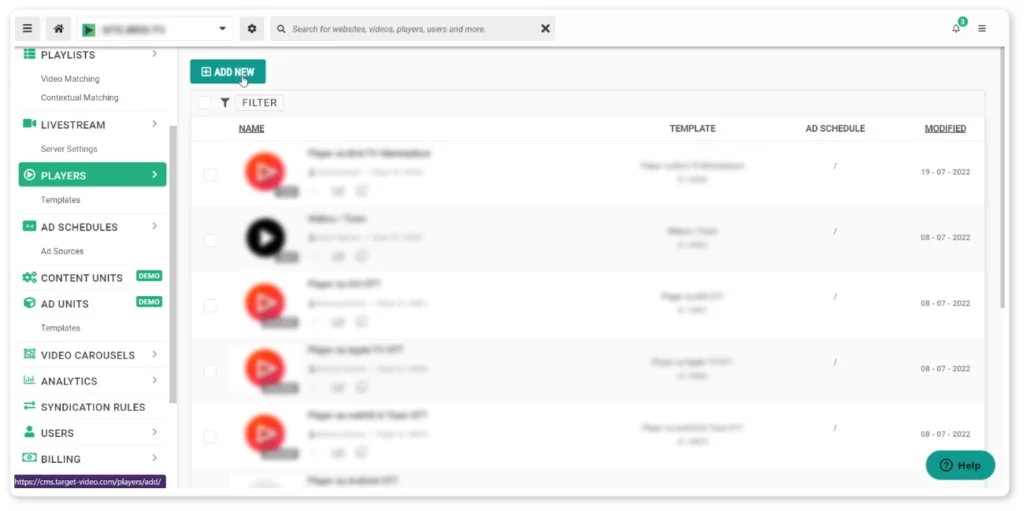
- Step Two: Under Set Player Behavior, choose the Sticky Player panel, and enable the Stick Player to Viewport option.

See the Floating Video Player in Action: Floating Video Player Demo
Use Smart Playlists
Smart Playlists allow publishers to organize and present multiple videos in sequential or curated order. They can create custom playlists based on topics and themes (specific tags) or IAB categories. The main benefit of playlists is, of course, the continuous playback. Once one video ends, the next video in the playlist automatically starts playing, and so on. Since they have a longer duration time (contain more than one video), playlists give publishers more room for instream video ads and raise the chances of ad viewability.
See the Playlists in Action: Playlist Content Unit Demo
Activate Autoplay
A great way to boost viewability is to use the video player’s autoplay functionality. This means that your video plays automatically the moment your website loads or when a user navigates to a specific section of your website page. Most online businesses prefer autoplay (99.87% ) over click-to-play. Autoplay can especially increase viewability for pre-roll ads as they appear at the very beginning of the video.
Force Sound Feature
TargetVideo’s newly added video player feature – force sound if possible – when enabled, automatically plays the video sound whenever allowed by the browser or the player environment (on low volume, to keep the experience as user-friendly as possible). Paired with Google’s new rules on muted ad inventory, this feature can help you increase CPMs and boost fill rates.
Improve Core Web Vitals
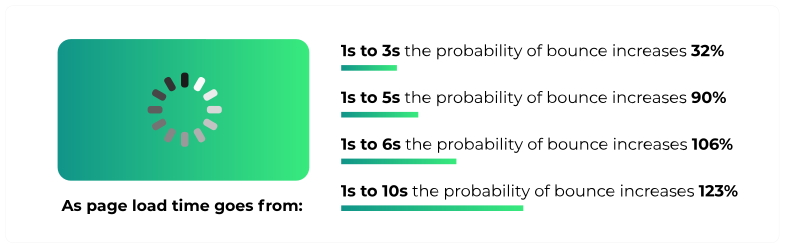
If your website offers poor user experience, such as long loading and slow response time, chances are you’ll see a rise in bounce rates. According to Google, the bounce rate for a web page that takes one to five seconds to load increases by 90%. To avoid this, you should focus on better optimization of your core web vitals (LCP, FID, and CLS). In addition, you should always be using a video player that won’t hinder your website performance.
For instance, if you’re using TargetVideo’s lightweight video player with low latency, it won’t affect your page loading time. Overall, improving your website performance can lead to better positioning on search engines and enhance website traffic, creating more opportunities to serve ads and as a result, higher ad viewability.
Improve Player Latency
A fast video player is essential for reducing ad loading times and minimizing delays between the ad call and playback. Fortunately, TargetVideo publishers don’t have to worry about this. Our highly optimized HTML5 video player is built to handle these issues, ensuring smooth playback by showing fallback content or retrying if it doesn’t get a response from the ad server.
ATF vs. BTF Ads
ATF (above the fold) refers to the area of a page that the user sees without scrolling down. While anything below this abstract line is considered BTF (below the fold). The “fold” line will entirely depend on the devices users use to view your website.
Publishers measure scroll depth to determine which areas are best for ad placement. Usually, ATF ads tend to perform better. However, you shouldn’t overpopulate your ATF area with ads for better impressions or push all your ads below the fold. Testing both options to see which ads perform better on your website should suffice.
Optimize for Mobile
With mobile traffic comprising more than half of overall global traffic, optimizing content for mobile is a must. To make sure your video ads get higher viewability on mobile devices, you should focus on the size — 120×240, 240×400, 234×60, and 320×50. A good practice would be to employ the Google AMP (accelerated mobile pages) component framework and, of course, a quality AMP video player that allows publishers to serve mobile-optimized content with faster loading time for all devices.
Boost Video Ad Viewability with TargetVideo
The TargetVideo Platform offers website publishers a wide range of tools to boost ad viewability and maximize ad revenue. With engaging player units and advanced AI-driven ad optimization tools, our publishers can effortlessly fine-tune their ad monetization strategies. For those starting out or looking to avoid the hassle of ad setup, TargetVideo’s Managed Video Player is the perfect solution. Our expert team takes care of everything, from content selection to ad configuration.
Want to enjoy the perks our publishers have? Contact our sales team and let’s get started!

Full Control Over Monetization
The Most Advanced Ad Tech
Multi-Role Library Management
OTT Apps for All Channels
Smooth Live Streaming
And More!
FAQ
1. What is the viewability of a video ad?
Ad viewability is a metric used to determine if an ad was actually viewable to the user, as opposed to being hidden or obscured on a webpage.
2. How can I improve video ad viewability?
You can improve video ad viewability by using sticky ad units, optimizing your video loading time, and making your videos playable on mobile devices.
3. How is ad viewability calculated?
By calculating the time (how long the video was in view) and the percentage of video in view (the portion of the video shown on the screen).


