
A visitor lands on your website. They scroll, pause on a video, maybe even hit play — then drop off within seconds. No interaction, no return visit, no ad revenue. It’s a common scenario for many publishers, and a costly one. Because, while video may be one of the most powerful formats in digital publishing, it only delivers results when it truly engages. Just having video content on your website isn’t enough — it’s how that content performs that matters. The ability to capture attention, keep viewers watching, and encourage interaction can make or break your video strategy. So to help you, we’ve gathered 10 tips on how to improve video engagement on your website.
- Why Publishers Can’t Afford to Ignore Video Engagement
- 10 Tips to Improve Video Engagement
- Know What Your Audience Watches
- Quality Makes All the Difference
- First Impressions Matter
- Use Smart Engagement Tools
- Remember, Vertical First
- Use Data to Understand What’s Working (And What’s Not)
- Help Online Users Find You
- Keep It Short, Minds Wander Fast
- Make Your Content Accessible to All
- Don’t Just Publish, Actively Share It
- TargetVideo Has Everything You Need to Keep Viewers Watching
- FAQ
Why Publishers Can’t Afford to Ignore Video Engagement
Before we dive into the how, it’s important to understand the why. Engagement determines whether your video strategy delivers real value or falls flat. Whether you rely on video to generate ad revenue or build lasting audience relationships, strong engagement is the common denominator that drives performance. Engagement heavily impacts:
-
Earnings and visibility (low engagement means limited audience growth and fewer ad impressions)
-
Time spent and return visits (if viewers lose interest quickly, they’re unlikely to stay or come back)
-
Search result rankings (videos with poor engagement are less likely to appear in top search results)
-
Content planning (without engagement data, it’s difficult to understand what content performs well)
-
Use of time and budget (investing in videos that no one watches results in wasted resources)
-
Trust in your brand (low engagement can signal to audiences that your content isn’t relevant or valuable)
-
How far your video spreads (videos that don’t engage are rarely shared, limiting your reach).
10 Tips to Improve Video Engagement
Want your videos to capture attention and keep viewers on your website longer? Here’s what to focus on to boost engagement.
Know What Your Audience Watches

This one might be obvious, but as a publisher, you need to make sure that your video content correlates with the user’s intent and is contextually relevant to them. You have to know which type of video content your user base enjoys. If not, it is unlikely that they would engage with your videos, let alone watch them till the end.
Quality Makes All the Difference
No matter which video content sourcing strategy you go for, whether you plan to produce content yourself or purchase/lease from production agencies, the videos must be high-quality. This applies to both the sound and video quality. If users can’t see the video clearly or if the audio is distorted, they’ll probably stop watching or interacting with your video.
No Content of Your Own? We Suggest: TargetVideo’s Exclusive Video Library! Get access to thousands of relevant videos across different content verticals and feature them on your websites. Auto, Sport, DIY, Health, Parenting, Lifestyle, Fashion, and more — we have it all!
First Impressions Matter
A compelling thumbnail image can significantly impact the click-through rate for your content. It’s the first thing viewers notice — and often the deciding factor in whether they hit play. To boost your click-through rate, use a bold, custom image that clearly reflects your video’s content. The more eye-catching and relevant it is, the more likely your audience is to engage with the video.
Use Smart Engagement Tools
Engagement features like video chapters break content into easy-to-use sections, making it easier for your viewers to jump straight to the parts they want to watch. This makes videos more enjoyable and keeps people watching longer by giving them control over their experience.
Similarly, playlists group related videos together, making it simple for viewers to watch multiple videos one after another without needing to do anything. This helps them explore more content and stay on your website for longer periods. Your playlists should also be versatile in terms of behavior, for instance, features like skip to next video, content previews in the playlist, playlist loop, and similar.
TargetVideo’s Smart Playlists allow publishers to curate automatic playlists based on specific video tags or IAB categories, creating an unmatched, attention-grabbing viewing experience for audiences. Learn more about our playlists and other engagement-boosting features — get in touch with us!
Remember, Vertical First
Online users today watch content on the go. This means your target audience is most likely on their phones, and almost always watching vertically. In fact, mobile now dominates global web traffic, accounting for over 62% of web page views worldwide as of January 2025 (excluding tablets). And with 90% of mobile video views happening in portrait mode, the message is clear: if it doesn’t fit the screen, it doesn’t hold attention. This means that your video player not only needs to be mobile-optimized, but it should also match modern viewing habits.
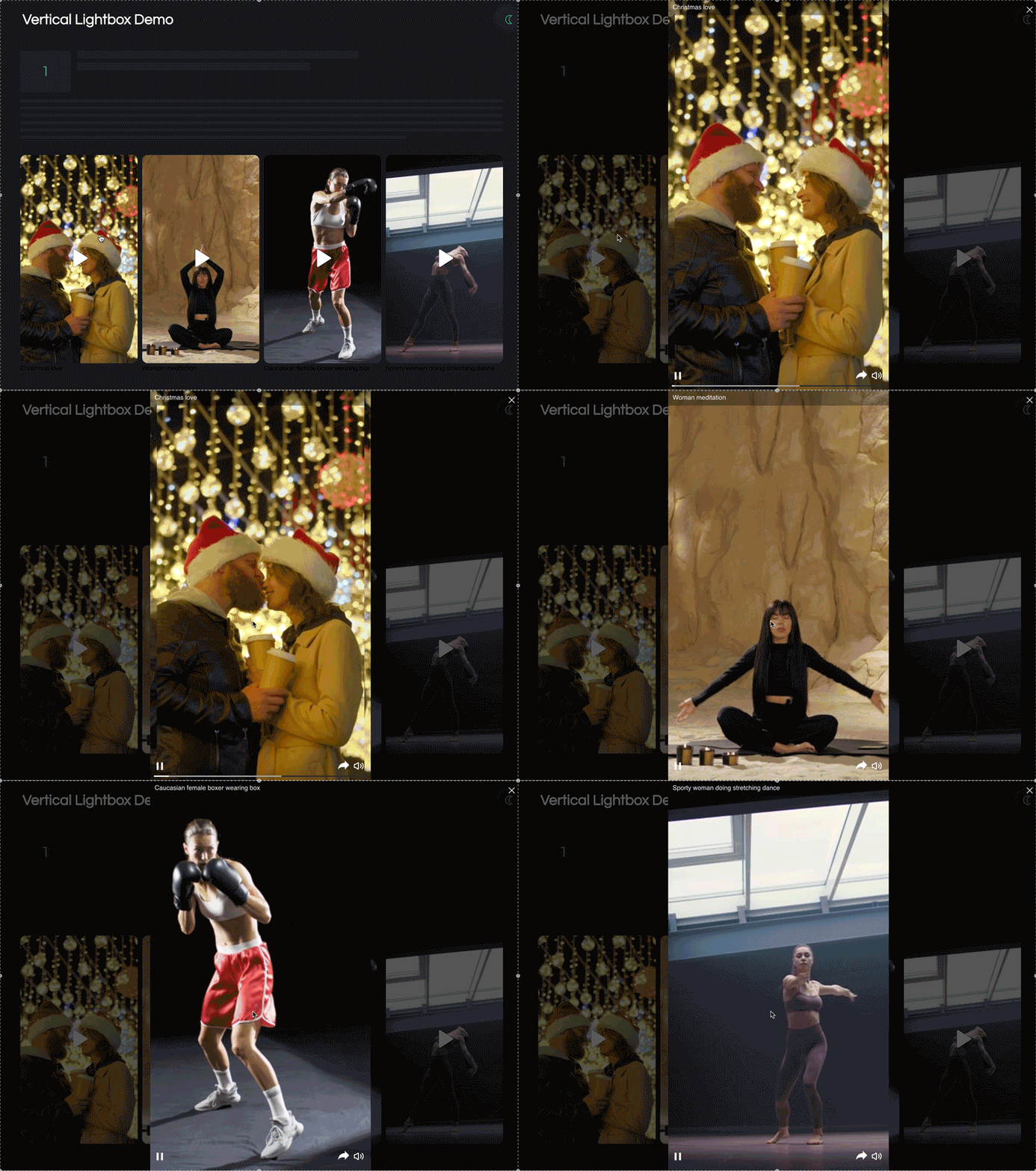
TargetVideo’s Player does exactly that — with a vertical mode built for today’s mobile-first formats, and the Vertical Lightbox content unit that follows the familiar TikTok and Reels model. This full-screen, vertical format is designed for interaction, allowing viewers to like, share, or read a short description while the video plays. You can also include a custom button that can lead to any of your other website pages, articles, or related video content. This way, you can deliver both editorial and branded content in a way users already love.
Use Data to Understand What’s Working (And What’s Not)
To see which videos get the most attention and what kind of content works best, publishers need to keep track of video performance (play rates, views, etc.). This can easily be done by using a powerful video analytics tool. These tools can help you better grasp audience behavior. For instance, you can get information on average user watch time or drop-off points within the video. This gives you insight into how long your next video should be and the optimal points within the video to place ads for effective monetization (if you monetize your content).
Help Online Users Find You
Start with smart SEO. Optimize your titles, descriptions, and tags using the right keywords to attract the audience you actually want. Viewers are far more likely to click on content or a video that is related to their search query or speaks directly to their interests. If you’re unsure how to choose the right keywords, tools like Google Trends can point you to the relevant keywords people are searching for.
Keep It Short, Minds Wander Fast
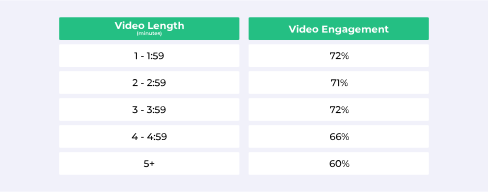
Getting people to stick around during a video these days is quite the challenge. Unless you’re producing long-form entertainment like podcasts or tutorials, there’s usually no need to go beyond the 3-minute mark. Short-form videos consistently achieve higher watch times and are better suited to today’s fast-paced viewing habits. Naturally, the ideal length still depends on your content — vlogs and product reviews often perform well with more runtime.
From a monetization perspective, short-form content is especially effective. It’s faster and more affordable to produce, and it aligns with user demand for bite-sized content. If you’re worried shorter videos won’t fit enough instream ads, features like playlists solve this. They give users a seamless sequence of relevant videos, with natural breaks where you can place ads.
You Might Also Like: Monetizing Long-Form vs. Short-Form Video Content
Make Your Content Accessible to All

Studies show that 75% of mobile users watch videos on mute. You can work around this by adding easy-to-read subtitles. For instance, incorporating bright-colored large letters.
Subtitles don’t just help with silent autoplay, they also boost accessibility for viewers who are deaf or hard of hearing. In addition, including subtitles in multiple languages can also expand your reach, making your content more inclusive and appealing to a global audience.
And don’t forget: subtitles also improve video SEO, making your content easier to discover on search engines.
Don’t Just Publish, Actively Share It
There are many ways that you can promote your video content, some of the more common channels being social media, blogs, and newsletters. Post on your socials, write about your video content in your blog, and send your subscribers email newsletters to keep them updated. If you decide to go the social media route, remember that relevant hashtags can boost your social media posts’ reach (you can create these using the right TikTok hashtag generator).
TargetVideo Has Everything You Need to Keep Viewers Watching
Driving real video engagement takes more than just uploading content — it requires the right tools, formats, and insights. At TargetVideo, we’ve built our video player and engagement features specifically with publishers in mind. From vertical-first design and smart playlists to customizable overlays and detailed analytics, our solutions are made to help you hold attention longer, improve watch times, and boost monetization opportunities.

End-to-end solution for publisher monetization, video content, and audience engagement. You embed the player – we do the rest!
Learn MoreFAQ
1. How can I increase engagement on my videos?
You can increase engagement on your videos by using interactive features like chapters and playlists, adding subtitles, optimizing your content for mobile, and actively promoting your videos through different channels.
2. Do thumbnails really impact video engagement?
Yes, thumbnails play a crucial role in driving engagement. Bold, custom thumbnails increase click-through rates and help draw viewers in.
3. How long should a video be to keep viewers engaged?
To keep viewers engaged, you should keep videos under 3 minutes — unless you’re creating long-form content like tutorials or podcasts.


